DocuHive is a self-hosted document archive: mail, phone photos, scans and uploads go in; a searchable, AI-sorted archive on your own storage comes out. Under the hood it is three things working together: a lossless document pipeline, a shared harness for every LLM agent task, and a single PostgreSQL database that carries the job queue, full-text search and vector search. On top of those sits a self-hosted knowledge base in the style of Amazon Bedrock, which other agents can query. This is a walkthrough of how the pieces fit, why we chose boring infrastructure for most of it, and why we built the knowledge base ourselves instead of adding a RAG platform next to the archive.
The stack is Python with FastAPI for the service, a Next.js web app in front of it, Strands Agents for the agent loop, separate clients for embeddings, and Docker Compose for the local services. The story behind the project is in the Journal; this article stays with the engineering.
Use boring infrastructure for the parts that must never lose data, and spend the interesting engineering on the parts that must never be trusted blindly.
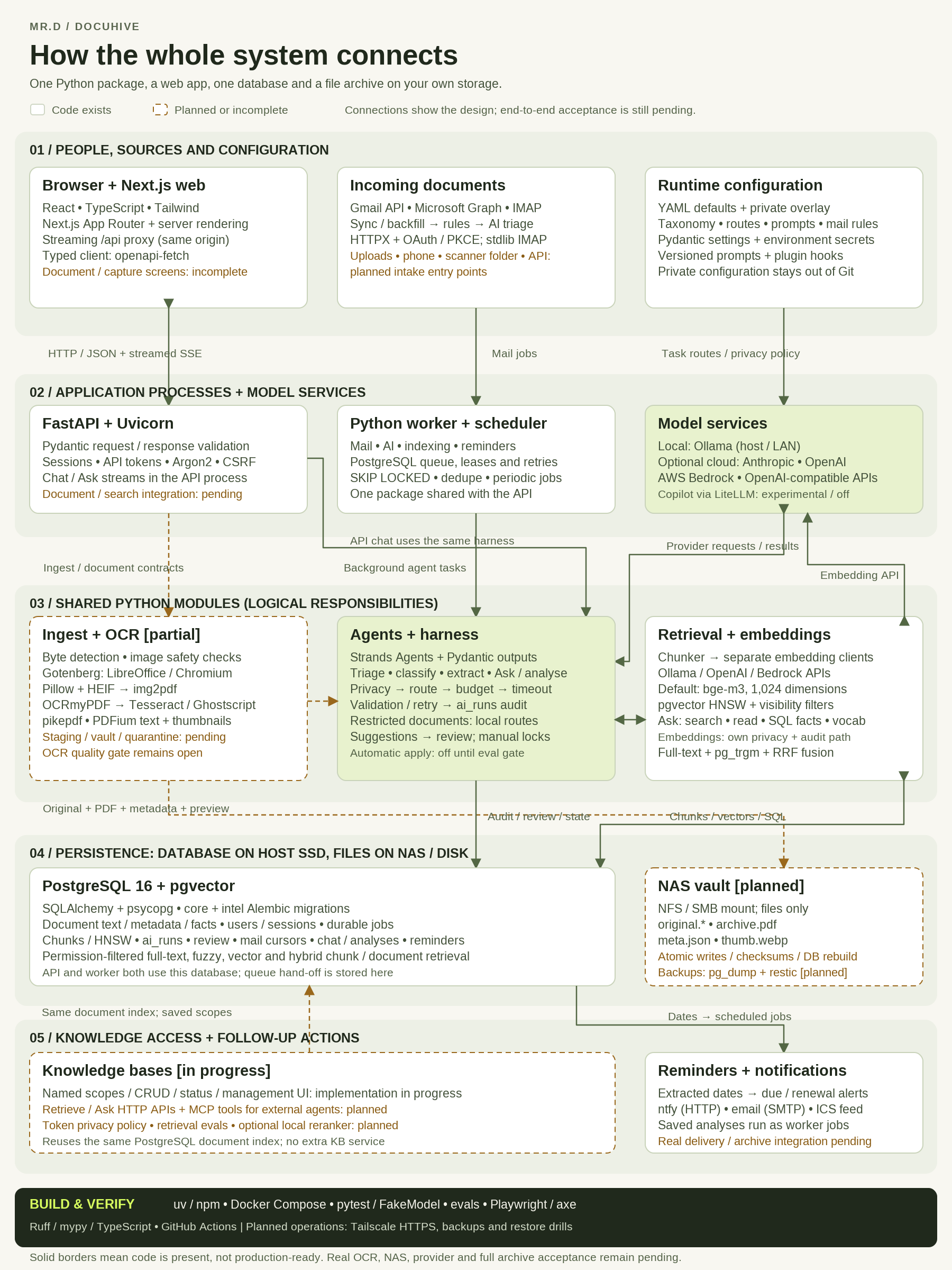
Solid outlines mean code exists; amber dashed outlines mark planned or incomplete work. The map was drawn before release 0.2.0: intake, the vault, backups, the document screens and knowledge-base management have been built since, and work on test data. The knowledge-base retrieve and Ask APIs and MCP are still planned, and acceptance with real providers on the target hardware is pending. Open the map for full size.
One way in, whatever the source
Documents arrive from mail sync and mailbox backfill, a web upload, a phone capture
page, a watched scanner folder or an API token. All of them end in the same call,
ingest.submit. A manual upload gets exactly the same analysis and storage
as an email attachment, which removes a whole class of “works for mail but not for
uploads” bugs before they exist.
The ingest stage is a fixed sequence of small modules:
- Detect and check. Identify the real content type from the bytes, not the filename, and reject unsafe content before anything parses it.
- Convert. Office files and HTML mail go through Gotenberg to PDF.
- OCR. Scans and photos go through OCRmyPDF and Tesseract, producing a searchable archive PDF with a text layer.
- Extract and preview. Pull the text and render a thumbnail.
- Write the vault, then emit events. Classification, extraction and indexing run as follow-up jobs.
Nothing is dropped on the way. Files are staged on local disk before anything parses them, a file you already have is recognised by its checksum, and a file that cannot be read, such as an encrypted or damaged PDF, goes to a quarantine with its reason instead of disappearing. The tests generate a set of hostile files (a zip bomb, PDFs with scripts or an endless cross-reference loop, an oversized image, an email with a tracking pixel) and run them through the real pipeline: each is refused, quarantined or stored inert, and the worker never crashes.
OCR quality is the one stage we refuse to assume. It sat behind a measured gate, with Paperless-ngx written down as the fallback before anything was measured, which kept us honest about the result. Our own core was selected, and the character error rate on real scans is now part of the release check rather than an open design question. With German and English OCR on a laptop, a five-page scan is stored in under 13 seconds against a 60-second target.
A vault that does not need the app
The source of truth is a folder tree on your storage, usually a NAS. Each document gets a sortable, unique ID and its own folder:
vault/<year>/<ULID>/
  original.<ext>   # the bytes exactly as received, never modified
  archive.pdf      # searchable PDF with the OCR text layer
  meta.json        # title, category, tags, facts, provenance
  thumb.webp       # preview image
The design makes document records and their metadata rebuildable from the vault:
metadata changes belong in meta.json as well as in the database.
Accounts, mailbox cursors, chat history and other application state still need a
PostgreSQL backup. Rebuilding is one command, docuhive vault rebuild,
and it has been rehearsed: restore a backup into an empty database, rebuild from the
vault, and the document records come back identical, however often you run it.
Backups follow the same idea. A nightly job stops the API and workers, dumps PostgreSQL and checks the dump can be read, backs up the vault and the upload staging area with restic, and starts the writers again, so the database and the files always describe the same moment. A vault whose ID does not match the database, such as an empty folder where the NAS should be mounted, is never written to: uploads wait in staging until the right storage is back, and the backup refuses to run.
One PostgreSQL for jobs, text and vectors
A personal archive does not need a message broker, a search cluster and a vector database. PostgreSQL covers all three well enough, and one database means one backup, one migration story and transactional consistency between “document saved” and “job queued”.
The job queue
Jobs are rows. Workers claim them with SELECT … FOR UPDATE SKIP LOCKED,
so several workers can pull from the same table without stepping on each other:
job = db.scalar(
    select(Job)
    .where(Job.status == "pending", Job.queue.in_(queues),
           Job.run_after <= now)
    .order_by(Job.run_after, Job.id)
    .limit(1)
    .with_for_update(skip_locked=True)
)
Queues separate the slow work (ocr, ai, mail)
from everything else, so a big mailbox backfill cannot starve a document you just
photographed. Claimed jobs carry a lease; if a worker dies, the lease expires and
the job is picked up again. Retries use exponential back-off, and periodic tasks such
as mail sync run under a single elected scheduler.
Full-text and semantic search
Full-text search uses PostgreSQL text search with custom German, English and simple
configurations that strip accents first, so “Rechnung” and “Rechnungen” match and
accented names do not get in the way. pg_trgm handles fuzzy matches on
names and titles. For meaning, documents are split into chunks, embedded, and stored
with pgvector behind an HNSW index.
The two result lists are combined with reciprocal rank fusion, which only needs the rank of each hit in each list, not comparable scores. Every query is filtered by the same permission function first, so search, chat and analyses can never see a document the user cannot open. Full-text, semantic and fused chunk/document retrieval are implemented. Over 20,000 synthetic documents on a laptop, word search answers in a median of 174 milliseconds.
Embeddings use separate Ollama, OpenAI-compatible or Bedrock clients rather than the Strands agent loop. The chunker prefixes text with document metadata; both indexing and query embedding use the same vector space. Indexing checks document privacy before sending text and logs attempts, while the agent harness handles LLM budgets, validation and tool use.
The agent harness: the only door to a model
Classification, fact extraction, mail triage, chat and analyses all use AI, and all of them go through one module. Feature code never builds a Strands agent itself. It asks the harness to run a task, and the harness does the same steps every time:
privacy gate → routes (primary, fallbacks) → budget check
  → Strands call with timeout
  → domain validation (one retry with the error text)
  → one ai_runs row for every attempt
Routing per task
Which model runs which task lives in a routing.yaml, merged with a
private overlay so personal settings never land in the public repository:
providers:
  ollama:    { kind: ollama, local: true }
  anthropic: { kind: anthropic, local: false }
  bedrock:   { kind: bedrock, local: false }
tasks:
  classify:
    route: ollama/<local model>
    apply: { auto: false, threshold: 0.80 }
  chat:
    route: anthropic/<cloud model>
    fallback: [ollama/<local model>]
privacy:
  classify_unknown_locally: true
  restricted_tags: [private]
budgets:
  anthropic: 10   # USD per month
Ollama, Anthropic, OpenAI-compatible servers, Bedrock and an experimental GitHub Copilot route through LiteLLM are all providers behind the same interface. A task can fall back to a second route when the first fails or the monthly budget is spent.
A privacy gate the database enforces
Categories such as health and identity documents are marked restricted in the
taxonomy, and so is anything carrying a restricted tag. Restricted documents may only
go to a provider marked local. An unclassified document is treated as
restricted until a local model has classified it, because its sensitivity is unknown
until then.
The gate lives in code, but the guarantee lives in the schema. Every model call is
logged in ai_runs, and that table carries a check constraint:
CHECK (NOT restricted OR local)Routing and tool masking must exclude restricted text before a provider request. The constraint catches an inconsistent audit record, but logging happens after an attempt, so the database alone cannot prevent a network request. Both checks belong in the design.
Structured output that the domain checks
Strands returns typed Pydantic objects for classification and extraction. The harness then validates them against the domain: the category, type and tags must exist in the taxonomy, an amount must be positive with a real currency code, a date has to fall in a plausible range, and an IBAN must pass its checksum. On a failure it retries once with the validation error in the prompt, then gives up and records why. The result is either a clean object or a clear failure, never a half-parsed guess.
Suggestions, review and field locks
Every AI result is a suggestion with a confidence per field. Each task has an automatic-apply threshold, with stricter values for fields that hurt when wrong, such as the document date and the sender. Automatic apply stays off until the evaluation set shows a task is reliable; until then everything lands in a review queue.
Edits go through one function, documents.apply_metadata. When a person
changes a field, it is locked, and later AI runs skip it. Re-running AI on a document
can improve what the model owns without undoing what a human decided. Every field
carries its provenance, so the UI can show whether a value came from a model or
from you, with the model's confidence and a link to the run that produced it. You
can clear a field or hand it back to the AI; an undo button is still to come.
Chat that cites and calculates
The ask agent is a Strands agent with four tools: search_documents,
read_document, query_facts and list_vocabulary.
It searches, reads the relevant documents, and answers with citations to each
document it used. Questions about money or dates use query_facts, which
reads scoped facts through SQL and computes Decimal totals per currency, returning
the rows it used. The model writes the explanation around calculated values.
Tool calls are capped per answer, and the scope a user picks (a category, a date range, local only) is baked into the tools when they are built, so the model cannot widen its own search. Answers stream as server-sent events from FastAPI through the Next.js server, which proxies every API request so the browser only ever talks to one origin.
A self-hosted knowledge base, Bedrock-style
Chat inside DocuHive was never the whole goal. We also wanted the archive to work the
way an Amazon Bedrock knowledge base
does for other applications: named knowledge bases, a visible indexing status,
metadata filters, and two calls any agent can make. Retrieve returns ranked
passages; RetrieveAndGenerate returns an answer with citations. The
difference is where it runs: on an always-on Mac mini with 32 GB of RAM, next to
Ollama, with the documents on a NAS.
A knowledge base is a view over documents you already manage, not a second copy of them.
What we compared
The obvious route is a dedicated RAG platform next to the archive. We looked at the usual candidates and one build-your-own stack:
| Option | Good at | Why not for us |
|---|---|---|
| RAGFlow | Closest to Bedrock's shape; strong parsing of complex PDFs and tables | Asks for 16 GB of RAM for its own services, brings Elasticsearch or Infinity, object storage and Redis, and ships no ARM64 images |
| Open WebUI | Light, Ollama-native, a good chat UI | A knowledge base inside a chat app, not a service; its licence now forbids removing its branding |
| Dify | Knowledge bases plus workflows and agents | A second, heavy platform; its licence restricts multi-tenant use and removing its logo |
| AnythingLLM | The easiest install | Workspace-oriented; sync features still in preview |
| LlamaIndex + Qdrant | Full control of the API | A vector database and a large framework to do what our chunker and pgvector already do |
Each one is good software. They all fail our case the same three ways:
- Copies. The platform parses and stores the archive a second time, outside the vault. The rule that the vault is the source of truth stops holding.
- Permissions. It knows nothing about DocuHive's users, ownership and sharing. A sync job would have to copy those rules and keep them in step forever.
- Privacy. It embeds and answers over health and identity documents with whatever model it is set up for, outside the privacy gate that keeps them local.
What DocuHive already had
Mapping Bedrock's features onto the code settled it. Most of a knowledge base was already there, because the archive needed it for search and chat:
| Bedrock knowledge base | DocuHive |
|---|---|
| Data sources and sync | Mail sync and import, upload, phone capture and a scanner folder, all through one ingest path |
| Parsing | OCRmyPDF and Tesseract, Gotenberg for office files |
| Chunking and embeddings | ~800-token chunks with a metadata header, embedded with a local model |
| Vector store | pgvector with an HNSW index |
| Metadata filters | Category, type, sender, tags, dates, source |
| Retrieve and generate | The Ask agent, with citations and SQL totals |
| Access control | One permission rule on every query; restricted documents only reach local models |
What was missing was the part other applications see: named knowledge bases, a retrieval API, a way for agents to connect, and a measure of retrieval quality. So we decided to build the knowledge base inside DocuHive, on the same PostgreSQL index.
How it works
A knowledge base is a saved scope, not a copy. "Insurance", "Finance" or "Property" are named filters over the one index, with an owner, sharing and a local-only setting. Retrieval is always the user's visible documents intersected with that scope. Sharing a knowledge base never shares documents the other person can't already see.
Retrieval works on passages. Full-text search runs over the chunks in German, English and a plain configuration at once, and vector search runs over the same chunks. The two lists are fused by rank, and no document may fill the result:
def rrf(*ranked):
    """[(item, fused score, rank in each list)], best first."""
    ranks = {}
    for i, items in enumerate(ranked):
        for rank, item in enumerate(items, 1):
            ranks.setdefault(item, [None] * len(ranked))[i] = rank
    scored = [(item, sum(1 / (60 + r) for r in rs if r), rs) for item, rs in ranks.items()]
    return sorted(scored, key=lambda t: -t[1])

# retrieve(): fuse chunk FTS and chunk vectors, keep at most 3 chunks per document
Fusing by rank means full-text and cosine scores never have to be compared. A passage that both lists find rises to the top, and a single long contract cannot push everything else out.
Two calls, like Bedrock. A retrieve endpoint returns ranked chunks with scores, document links and metadata. An ask endpoint runs the existing Ask agent inside the knowledge base's scope and streams an answer with citations. Requests can narrow a knowledge base but never widen it.
MCP for other agents. The same calls are exposed as MCP tools: list knowledge bases, retrieve, ask, read a document. Claude Code, a Strands agent or any MCP client can use the archive as its knowledge base, and the documents never leave DocuHive. Open WebUI still has a place, but only as a chat front end that calls these tools.
Privacy across the API boundary. This is the part a separate platform can't do. Inside DocuHive, the privacy gate knows which model will read the text. Once text leaves through an API, DocuHive can't see where the caller sends it. So retrieval for API and MCP callers leaves restricted documents out unless the access token is explicitly marked as a local-only consumer, and the response reports how many were left out, never their content. It is the same masking the Ask agent already applies when it runs on a cloud model.
Quality is measured, not assumed. A retrieval evaluation set of questions with the documents that should answer them, in German and English, with paraphrases and typos, reports recall at 5 and 20 and the mean reciprocal rank. Chunk size, the metadata header, the fusion constant and an optional local reranker only change when those numbers improve.
It fits on the Mac mini
| Process | Memory, roughly |
|---|---|
| PostgreSQL, API, worker and web | 2 GB |
| Embedding model | 1.2 GB |
| Optional local reranker | 1.1 GB |
| An 8B chat model | 6 GB |
| Total | about 10 GB of 32 GB |
RAGFlow alone would ask for 16 GB before any model loads. The knowledge base adds tables, endpoints, a command and a screen, not new containers.
Where it stands
The retrieval core is built and tested on PostgreSQL: hybrid document search, passage-level retrieval with rank fusion and the per-document cap, and one filter and permission rule shared by both sides. Saved knowledge bases, their indexing status and their management page are built as well. Next come the retrieve and ask endpoints, the MCP server and the evaluation set. The full plan, with the options we compared, is in the decision record and the implementation plan.
Making AI testable
The default test suite needs no API keys and no network. A FakeModel
implements the Strands model interface and returns scripted responses, so tests run
the real harness: routing, privacy gate, validation retries and run logging, without
calling a provider. A socket guard fails any test that tries to reach the network.
Model quality is a separate concern with its own tooling. An evaluation harness scores classification and extraction per field against a labelled set, and its gate decides when automatic filing may switch on for a task: at least 95% precision on the fields above the confidence threshold, and 90% on category and document type. That gate is meant to be passed on your own labelled documents, which stay in the private overlay; the public repo ships a synthetic set only.
On top of that, a separate quality track runs contract tests between the platform and the AI modules, browser journeys with Playwright, accessibility checks, and a scripted local AI provider for end-to-end runs. Its job is to prove the pieces fit, not that each one works on its own.
Hardening, with evidence
A security checklist lists every hardening item next to the test or file that proves it. Passwords, tokens, cookies and authorisation headers are masked in every log line, including the web server's own access log. A permission test walks every route in the API schema: nothing answers without a session except sign-in, the health check and the token-protected calendar feed, and no route shows one person's private document to another, administrators included. An OWASP ZAP scan of the running app, signed out and signed in, finds no failures.
What we would reuse
- Make the archive outlive the app. A self-describing folder per document turned migration and backup from features into non-issues.
- Put the model behind one door. Privacy, budgets, fallbacks and audit only work if nothing can go around them.
- Check privacy before the request. Route filtering and scoped tools stop restricted text from leaving; the database constraint checks the audit trail.
- Treat AI output as a suggestion until it is measured. Thresholds, review and field locks let automation grow with the evidence.
- Start with PostgreSQL. Jobs, full-text and vectors in one database is enough for a personal archive, and simpler to run at home.
- Build the knowledge base where the documents already are. A saved scope over the existing index keeps one copy, one permission rule and one privacy gate. A second platform would need all three again.
The repository keeps a learning path next to the code, with notes on privacy routing and the job queue and a runnable queue example, and it grows with each feature. If you are building something similar, start with the learning path.