

I set out to answer one question: what is the simplest way to build a RAG
assistant on an Amazon Bedrock Managed Knowledge Base? The answer turned out to
be five possible architectures, one API that doesn't work at all, and a pile of
orchestration options that mostly solve problems you may not have. My
recommendation: pick a Managed Knowledge Base unless you have a concrete reason
to run your own vector store. Then start with a plain Retrieve call
followed by a model call. Move to Agentic Retrieval when finding the evidence takes several searches.
Bring in an agent (AgentCore Harness, or Strands on Runtime) only when the
assistant has to choose between tools.
The question: how do I build RAG on a Managed Knowledge Base?
The setup is common. You have a Managed Knowledge Base full of documents and you want an assistant that answers questions from them, with citations. To keep this concrete, picture a support assistant for a hardware company. Its knowledge base holds product manuals and installation guides.
RAG itself is easy to explain: find the relevant passages, put them in the model's context, generate an answer. The trouble starts when you look at what AWS offers to wire it together. Knowledge Bases. Managed Knowledge Bases. Harness. Runtime. Gateway. Strands. A second model inside the retrieval step. Quite a lot of machinery for a question about a manual.
So I wanted to know what each layer actually contributes, and when it's worth paying for. My earlier guide to RAG patterns on AWS covers retrieval techniques. This one is about the application you assemble around the Knowledge Base.
Managed vs customer-managed Knowledge Base: which one to use
The first thing I hit was a wall. The obvious one-call API,
RetrieveAndGenerate, does not support Managed Knowledge Bases.
Most tutorials use it. They work because they run against the other kind of
Knowledge Base, the customer-managed one, typically backed by OpenSearch. So the
real first decision isn't the orchestration. It's which Knowledge Base you have.
AWS offers two kinds, and they are not the same product with a different backend. With a Managed Knowledge Base, you connect data sources and Bedrock runs everything after that: parsing, embedding, indexing, storage, scaling and retrieval. With a customer-managed Knowledge Base, Bedrock still runs the ingestion jobs and the retrieval API, but you choose, provision and pay for the vector store (OpenSearch Serverless, Aurora, Neptune and others) and you configure parsing and search yourself.
The differences that actually change your design, from AWS's own comparison:
| Managed | Customer-managed | |
|---|---|---|
| Vector store | Run by Bedrock, auto-scaling, no direct access | Yours to pick, size, patch and query directly |
| Search | Hybrid search plus agentic retrieval | Your own search strategy; no agentic retrieval |
| Embedding and reranking | Built-in models at no extra cost, or your own Bedrock embedding model (float32, 1024 dimensions) | Any Bedrock embedding model; reranking only if you add a model |
| Parsing | Built-in multimodal parser (PDF, Office files, scans, audio, video) | Default text parser, a foundation model or Bedrock Data Automation |
| Connectors | S3, SharePoint, Confluence, Google Drive, OneDrive, Web Crawler, Custom | S3 and Custom |
| Document permissions | ACL filtering at query time (not for Web Crawler) | Build it yourself with metadata filters |
| Agent access | Native AgentCore Gateway connector | Custom tool |
RetrieveAndGenerate | Not supported | Supported |
The pricing models are different too. A Managed Knowledge Base charges
$5 per GB of raw data per month for the index and $1 per 1,000 Retrieve calls,
with the managed parser, embedding model and reranker at $0. Agentic retrieval
adds $4 per 1,000 calls on top of the retrieves it makes. With customer-managed,
the big line on the bill is the vector store you run, whether anyone queries it
or not.
When I'd use Managed: almost every new project. Especially if the documents live in SharePoint, Confluence or Google Drive, if users may only see some documents, if you want agentic retrieval or agents calling the Knowledge Base through Gateway, or if nobody on the team wants to own a vector database. AWS recommends it as the default too, which is a vendor recommendation, but in this case I agree with it.
When I'd use customer-managed: when you already run OpenSearch or
Aurora and other systems query the same index. When you need to tune the search
strategy or index settings yourself. When your embedding model doesn't fit the
1024-dimension constraint. When your Region isn't one of the
eight that support Managed Knowledge Bases
(and in GovCloud, the managed version loses connectors, ACLs, agentic retrieval
and Gateway anyway). Or when you have a working RetrieveAndGenerate
app and no failure that justifies rewriting it.
The rest of this article assumes a Managed Knowledge Base, because that's where the new options live. And one warning that applies either way: switching kinds changes the integration contract, not just a database endpoint. A working OpenSearch example proves nothing about the managed offering.
What I checked next: which APIs work with a Managed Knowledge Base
Before drawing a single box, I went through the API references and service guides and wrote down what a Managed Knowledge Base can actually be called with:
Retrievereturns evidence and leaves the answer to you. Managed Knowledge Bases configure it withmanagedSearchConfiguration(hybrid search) instead of the customer-managedvectorSearchConfiguration. See the retrieval configuration.AgenticRetrieveStreamlets a model plan and repeat searches against Managed Knowledge Bases. It can also write the answer, or hand the evidence back to you.- The Knowledge Base connector in AgentCore Gateway exposes a Managed Knowledge Base as a tool for agents, with IAM-based outbound authentication. Other retrieval backends need a custom tool.
- Agents Classic is out for new projects. It's a separate service from AgentCore and has been closed to new customers since July 30, 2026. Existing users get documented migration paths to AgentCore.
With that list in hand, every architecture comes down to two separate questions. Who finds the evidence: one search, or a model-driven search loop? And who controls the workflow: your application code, or an agent? Mixing those two up is how people end up running a general-purpose agent to look up a paragraph.
One honest caveat before the options. This is a comparison built from the API contracts and AWS documentation, not a benchmark. When I talk about latency and cost below, I mean the structure of the work each design does. I haven't measured a winner, and neither has anyone who tells you one exists for every corpus.
Before adding an agent, name the decision you need it to make.
Five Amazon Bedrock RAG architectures
Here are the five designs side by side. All of them assume your application has already authenticated the user and knows which sources they may see. Ingestion and identity are left out. In the diagram, blue boxes own orchestration, green boxes hold evidence and purple boxes are model inference.
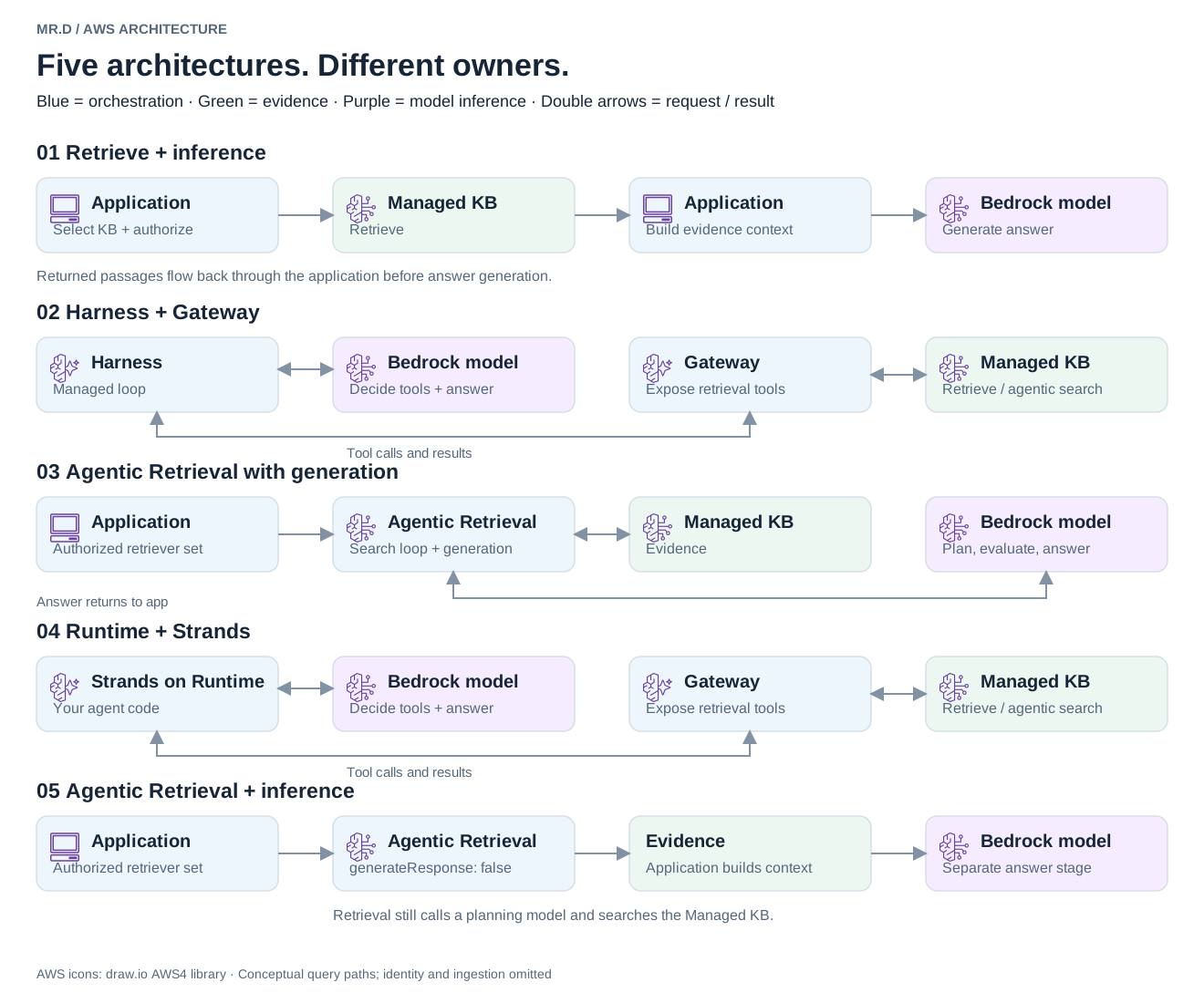
I'll walk through them as options I to V, in the order I'd reach for them. That isn't the order of the diagram, so each heading names its diagram section. Each step adds machinery, so each one has to earn it with a question the previous step can't answer. Options I, II and III keep your application in charge. Options IV and V hand the workflow to an agent.
Option I. Retrieve plus inference: the baseline (diagram section 1)
A customer asks the support assistant for the clearance needed around a specific unit. The answer is in one manual, on one page.
Your backend picks the authorized Knowledge Base, calls Retrieve,
builds a context from the returned passages and calls Converse or
ConverseStream. Bedrock hosts the model. Your code owns everything
else: the order of steps, the system prompt and how much conversation history goes
into each request. The Converse API
keeps model, messages and system instructions separate, which makes that easy.
What I like is the clean failure boundary. If the answer is wrong, either retrieval missed the passage or generation mangled it, and you can check which. What you pay is application work: keeping source identifiers, building citations, handling "the manual doesn't say" and trimming history. A model won't produce grounded citations just because you asked politely.
It's also the cheapest path to reason about. One answer-generation call per question, plus whatever embedding and reranking the retrieval does.
Option II. Agentic Retrieval with generation: when one search isn't enough (diagram section 3)
Now the customer asks: "Which installation requirements changed between the second and third generation of this product?" No single search returns both manuals plus the right sections of each. Option I starts to miss.
Here the backend calls AgenticRetrieveStream with an authorized
retriever list and generateResponse: true. Bedrock plans the
searches, looks at what came back, searches again if the evidence is thin, then
writes an answer with citation information. Your application still decides which
Knowledge Bases are in scope. The planner only chooses searches inside that set.
The agentic retrieval guide
describes the flow.
You can steer it with a retrieval instruction that covers search guidance, persona, answer format and answer policy. These are structured fields, not a free-form override of every internal prompt.
This is the option I find most underrated. You get a multi-step research loop without adopting an agent framework. The limit is that the service owns the loop. It searches well. It is not your workflow engine.
Option III. Agentic Retrieval plus inference: your own answer stage (diagram section 5)
Say option II finds the right evidence, but the product team wants every answer in a strict format with your own citation IDs and a fixed safety disclaimer. The retrieval is fine. The answer needs to be yours.
Call AgenticRetrieveStream with generateResponse: false,
take the evidence, and make your own model call through Bedrock. Bedrock plans the
retrieval. Your backend owns the system prompt, answer format and citation
mapping. The two stages can even use different models.
Two things caught me here. First, turning generation off does not turn off the
retrieval model. You still pay for planning and evaluating the search, then again
for your answer. Second, conversation history gets tricky. With a restored memory
session,
persistenceMode: DEFAULT only works with generation enabled.
For retrieval-only calls, set NONE and have your application save the
final exchange. Skip that and the next follow-up question refers to an answer the
retrieval session never saw.
Option IV. Harness plus Gateway: when the assistant has to choose tools (diagram section 2)
Next request: "My unit shows error E4. Is it still under warranty, and can you open a ticket?" Now the assistant reads a manual, checks a live warranty service and decides whether to create a ticket. That's a real choice between tools, and it's the first point where I'd bring in an agent.
The application calls InvokeHarness. The harness calls its model,
runs the requested tools through Gateway, feeds the results back and repeats
until it can answer or hits a limit.
Harness supplies the agent loop and runs on AgentCore Runtime,
so you configure it instead of coding it.
Gateway is plumbing, not reasoning. It exposes the Knowledge Base as a tool, and
an administrator binds which Knowledge Bases that tool can reach in the
connector configuration.
The agent picks from the tools it's given. It can't invent Knowledge Base IDs. The
tool can wrap a single Retrieve or agentic retrieval, if the lookup
itself needs several searches.
The harness configuration owns the system prompt and model defaults. With memory enabled, conversation state goes through AgentCore Memory. Set this explicitly, because the service API and the CLI don't create harnesses with the same defaults.
For the clearance question from option I, though, a harness just gives you a loop to test where a fixed sequence would do.
Option V. Runtime plus Strands: when configuration isn't enough (diagram section 4)
Last scenario: a warranty dispute. The assistant gathers evidence, runs a few independent checks, pauses for a human to approve a refund and resumes the next day, with explicit handling when a check fails. That's execution logic you can't express in harness configuration.
The application calls InvokeAgentRuntime, and your Strands code does
the rest: calls the Bedrock model, runs retrieval tools (through Gateway, or a
direct SDK call), returns results to the model and builds the final response.
Strands supplies the agent loop
and Runtime hosts your code.
You own the allowed Knowledge Bases, system prompt, model choice and persistence. A Runtime session is not a long-term memory design. Strands keeps conversation management, state and session management as separate pieces, and wiring them together is your job. That's the bill for control: packaging, tool contracts, session persistence, execution limits. And no, you don't need multiple agents to justify Runtime. Custom control flow is reason enough.
Where the LLM actually runs
Mapping these options cleared up one confusion I hear a lot: "the LLM is in Strands." It isn't. In all five designs, Bedrock serves the models. Your application, Harness, Strands or Agentic Retrieval only decides when to call them.
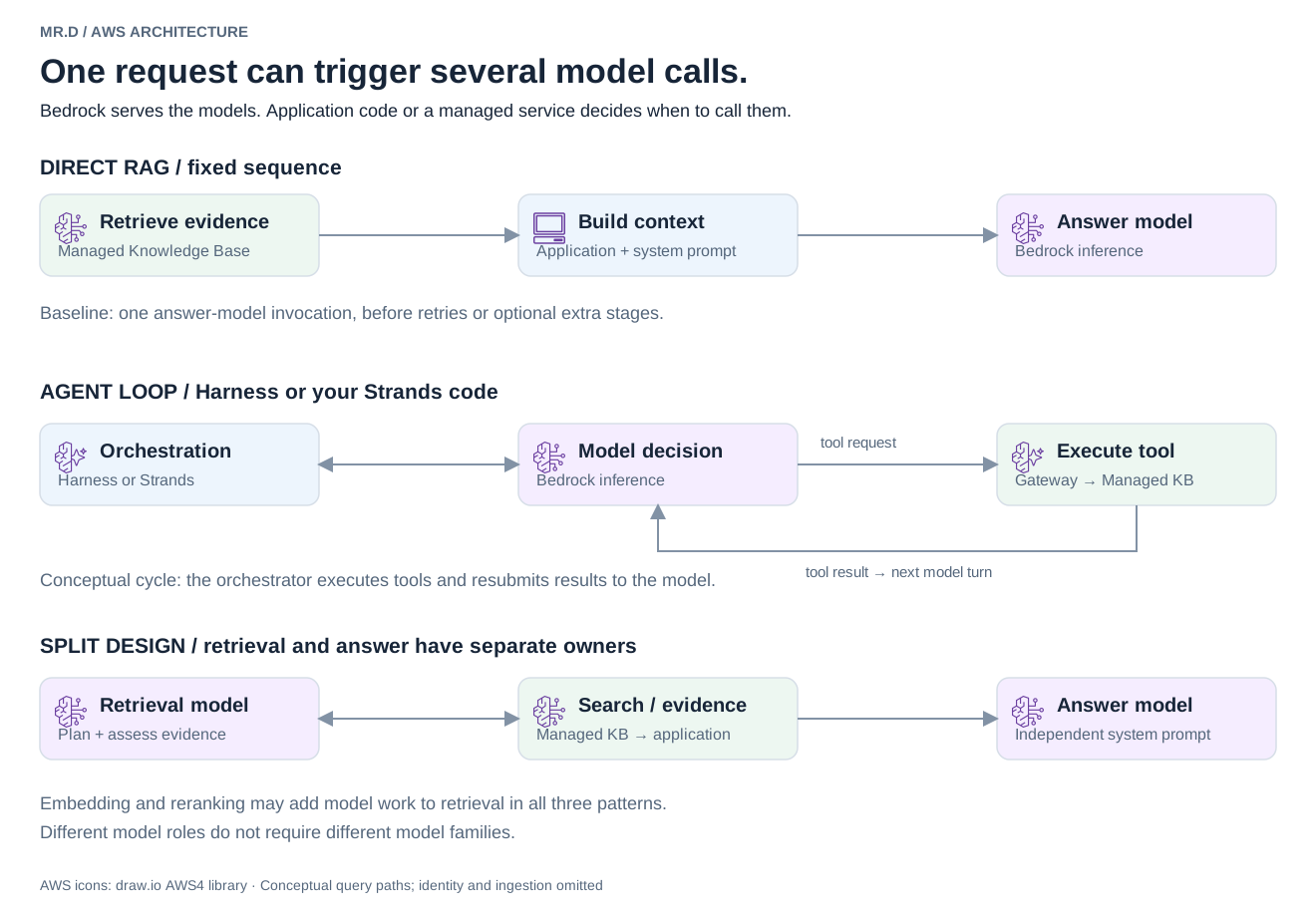
The diagram shows why that matters for cost and latency. One API request can hide several model calls, and they do different jobs. Embedding models turn text into vectors for search. Rerankers reorder candidate passages. A retrieval-planning model decides what to search and whether the evidence is good enough. An answer model writes the reply. One model can play several of these roles, but you still need to evaluate each role on its own.
Agentic Retrieval has its own model, reranking and iteration-limit settings. Picking a model for the final answer doesn't configure those. If you compare options, record both sets of settings or your comparison isn't one.
Comparison: complexity, latency, cost and control
This table is about structure, not measured rankings. "One API request" tells you very little about how much model work runs behind it.
| Approach | Model work | Control and complexity | Latency and cost drivers |
|---|---|---|---|
| I. Retrieve + inference (section 1) | One answer call in the baseline | Fixed application sequence; full answer control | Search, optional reranking, context size, generation |
| II. Agentic Retrieval + generation (section 3) | Planning, evaluation and answer | Managed search loop; structured instructions | Search iterations, evidence volume, generation, optional memory |
| III. Agentic Retrieval + inference (section 5) | Retrieval reasoning plus separate answer | Managed search; custom answer and history integration | Retrieval iterations plus final context and generation |
| IV. Harness + Gateway (section 2) | Model/tool loop; variable calls | Configured loop; tool and memory setup | Model turns, tool waits, Runtime, Gateway, memory |
| V. Runtime + Strands (section 4) | Your model/tool loop | Custom execution; most code to maintain | Chosen workflow, inference, Runtime and connected services |
On price, AWS says Harness itself carries no extra fee. The services underneath it and every model call still do. And input grows quietly: tool definitions, conversation history and retrieved context all land in the prompt on every turn.
Watch for nesting, too. An outer agent that calls agentic retrieval runs a loop inside a loop. If the inner retrieval writes an answer and the outer agent then rewrites it, ask what the second pass adds besides cost.
Best practices: prompts, history and testing
Whichever option you pick, most problems I'd expect come from unclear ownership rather than bad models. These are the rules I'd set before writing code:
- Give the system prompt one owner. In option I it's your backend. In Harness it's the harness configuration. With Strands it's your agent code. In option III there are two instructions, retrieval and answer, so keep them from contradicting each other.
- Pin the retrieval instruction version. Agentic Retrieval instructions are versioned. Deploy a numbered version, not the changing
DRAFT. Remember that persona, answer format and answer policy only affect generated answers, while search guidance applies either way. - Don't send history twice. With agentic session restore, pass the current question and the session binding. Don't also resend the old conversation in
messages. - Decide who saves the final answer. Especially in option III, where the model that wrote the answer isn't the one holding the session.
- Keep memory out of the evidence. Short-term conversation events and long-term memory are separate controls, and neither should replace the source documents behind a factual claim.
- Fix retrieval before adding reasoning. Better parsing, cleaner sources and sensible chunking often fix a weak answer that another loop would only paper over.
Then test the choice instead of trusting it. Fix the corpus, the access rules and the question set. Include direct lookups, cross-document comparisons, ambiguous questions and questions with no supported answer. Measure citation correctness, unsupported claims, retrieval misses, total completion time, time to first useful answer text and cost per acceptable answer. Report median and tail latency, failed requests included. A fast planning event is not a fast answer.
My recommendation: how to choose an architecture
Start by naming the decision your application can't make with a fixed sequence. If you can't name one, you don't need an agent.
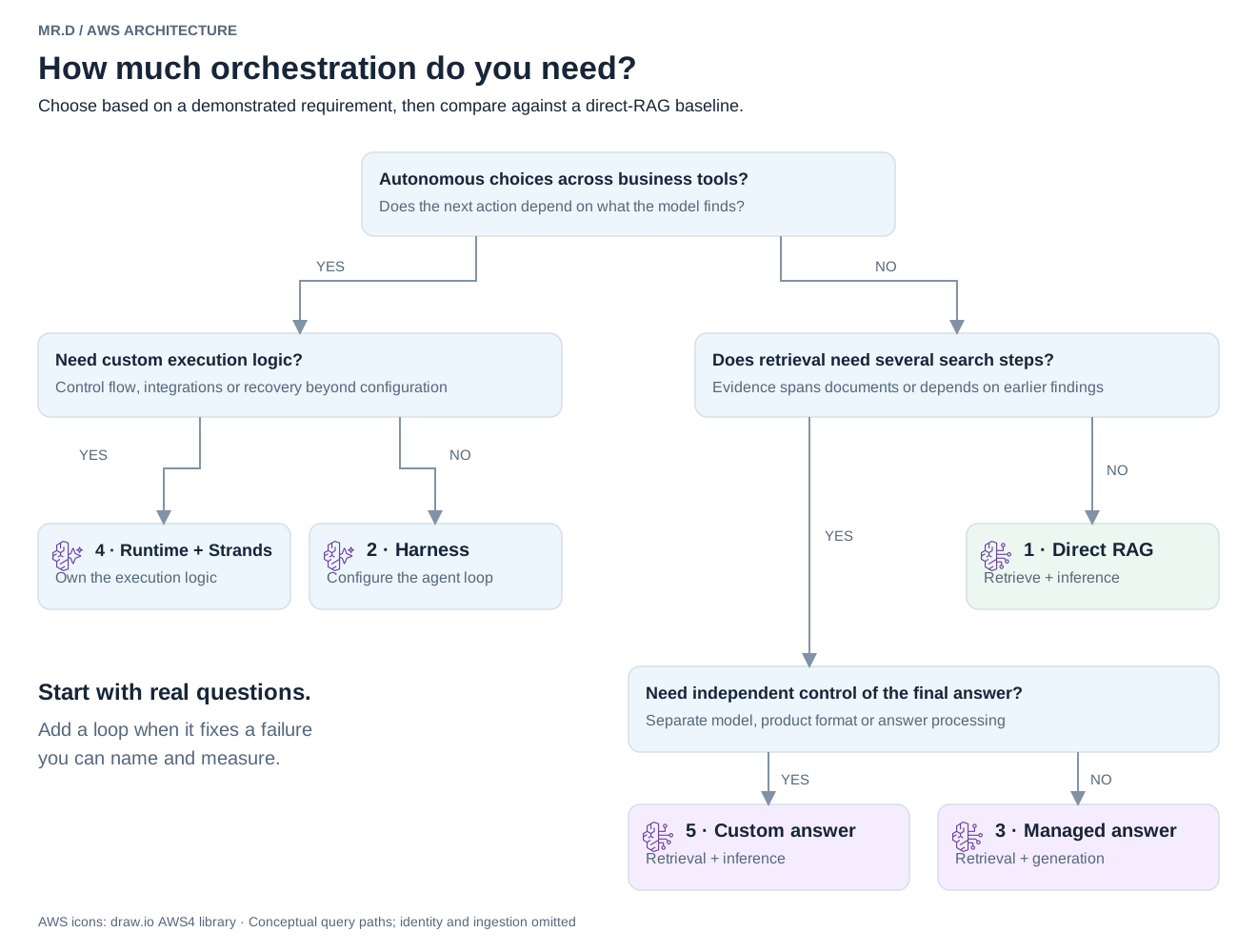
For the support assistant, that plays out like this. Build option I (section 1 in the decision tree) first, because most manual lookups are one search away. Run the hard test set against it. If cross-document questions fail, try option II (section 3) on those. If it finds the right evidence but the answer format fights you, move to option III (section 5). Only when the assistant has to check warranties and open tickets does option IV (section 2) make sense, and option V (section 4) only when you hit a concrete execution requirement Harness can't express.
Each move should point at failures it fixed. If you can't show them, you've just added a loop.